

SeedreamX

Seedream 5.0 Pro AI Image Generator Try Seedream 5.0 Pro Free

Seedream 5 Pro for text-heavy images: infographics, posters, menus and labels.

ByteDance Seedream 5.0 Pro is the Pro model of the Seedream 5.0 family, built for images where the words matter. Write a prompt with the exact text in quotes, or add up to 10 reference images and describe the change. Pick 1K or 2K and one of 15 shapes, and see the credit cost before you run it. A new account can make its first 1K image free. Below: four jobs we ran on Seedream 5.0 Pro, and when to pick Seedream 5.5 instead.

  • Dense text that stays readable
  • Up to 10 reference images
  • 1K or 2K in 15 shapes
  • First Seedream 5.0 Pro image free
0
50% OFF
Rainy Tokyo street portrait
Prompt idea
Prompt

Candid street portrait of a young woman in a mustard raincoat laughing under a clear umbrella on a rainy Tokyo side street at dusk, neon reflections on wet asphalt, shallow depth of field, 35mm film look.

What is Seedream 5.0 Pro?

ByteDance Seedream 5.0 Pro is the Pro model of ByteDance's Seedream 5.0 generation; its sibling is Seedream 5.0 Lite. ByteDance presents it as a model built for reasoning about and organizing information, which is why it leans toward text-heavy images: infographics, teaching material and professional layouts where many words have to sit in the right place.

ByteDance names four strengths: arranging information, dense text that stays readable, interactive editing of an existing image, and photographic quality. It also says Seedream 5 Pro writes text natively in more than ten languages.

On this site Seedream 5.0 Pro makes images from a prompt or edits from up to 10 reference images, one image per run, at 1K or 2K in 15 shapes from 1:3 tall to 3:1 wide. Other sites describe 4K output, web search, a thinking switch or layered editing for it; none of those are part of our generator.

ByteDance's Seedream 5.0 Pro page

Tested prompts

Seedream 5.0 Pro examples we ran

Four everyday jobs, each run once on Seedream 5.0 Pro at 1K on November 16, 2026 and shown as it came back. Each example says what it is for, what came out right or wrong, and what to change to reuse the prompt. Copy one into the generator above and swap in your own words.

A five-step infographic

The job: a how-to card for a shop's Instagram, a class handout or a team wiki. The prompt asks for a title, a subtitle, five numbered steps with an icon and a caption each, and a footer, about 60 words in all, printed as a two-color risograph.

Seedream 5.0 Pro kept the five steps in order, drew a matching plant illustration for each, and spelled all five captions and the footer right.

Prompt · Seedream 5.0 Pro · 1K · 4:5

A five-step infographic for a plant shop's Instagram, titled "Repot a Monstera in 5 Steps", with the subtitle "Do it in spring, when new leaves appear". Printed as a two-color risograph on off-white paper in deep teal and fluorescent orange, with visible grain and slight misregistration. Five numbered panels along a zigzag path, each with a big numeral, a simple line icon, a bold step name and a one-line caption: 1 "Water the day before" — "Moist roots slide out without tearing." 2 "Pick a pot 5 cm wider" — "Bigger pots stay wet and rot roots." 3 "Loosen the root ball" — "Tease circling roots outward by hand." 4 "Add a chunky mix" — "Bark, perlite and soil, one part each." 5 "Stake it and wait" — "No fertilizer for the first month." Footer in small capitals: "FERNHOUSE PLANT CO. · fernhouse.co".

What went wrong
Step 1 reads "Water the day night before": the model added a word. The comma in the subtitle also went missing. Read every line before you post.
To reuse it
Replace the title, the five step names and the captions with your topic, keeping each caption to one short line. Change the two ink colors and the footer to your brand. If one line comes out wrong, run it again or upload the image and ask for only that line to be replaced.
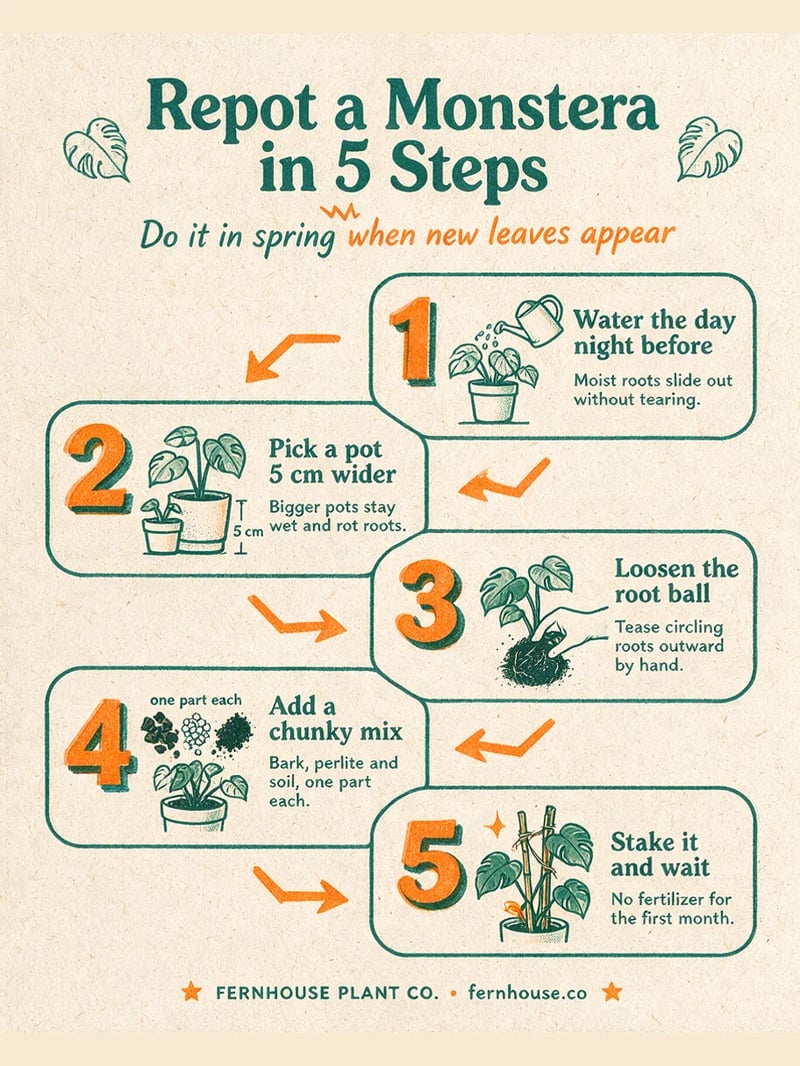
Seedream 5.0 Pro infographic titled Repot a Monstera in 5 Steps, in teal and orange risograph style, with five numbered steps, plant drawings, captions and a Fernhouse Plant Co. footer

One poster, three languages

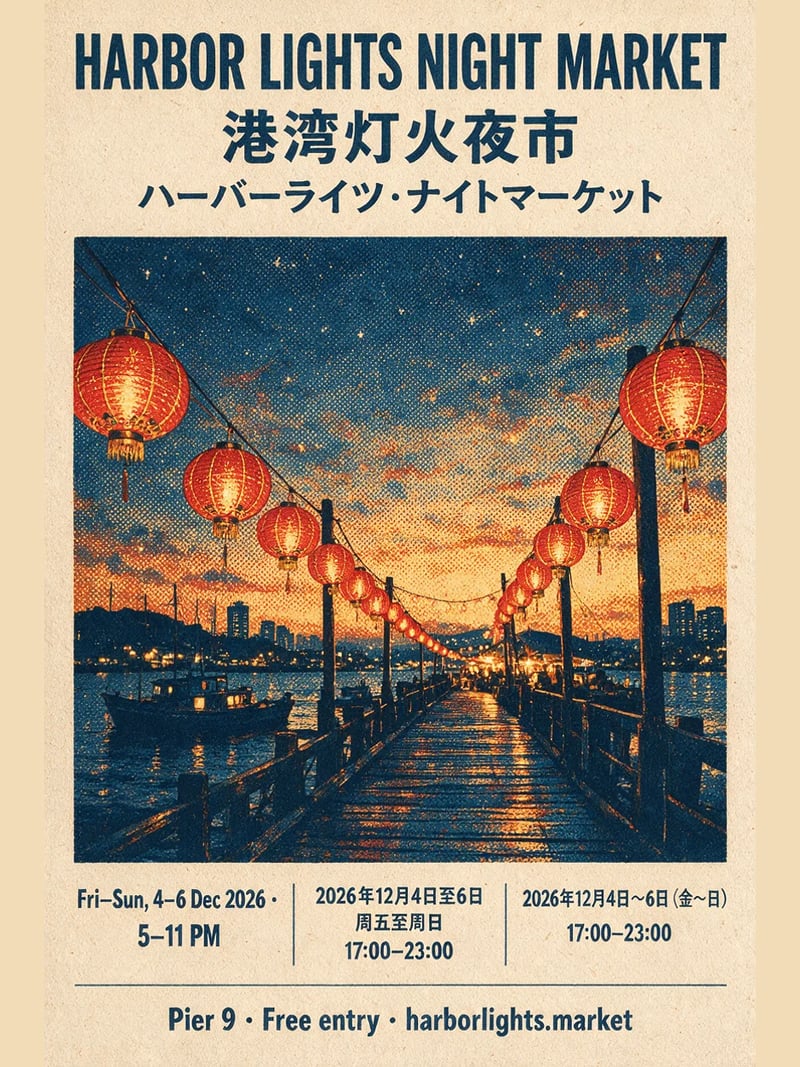
The job: an event poster for a city where people read English, Chinese and Japanese. One layout carries all three: the market's name in each language at the top, a halftone print of paper lanterns over a pier in the middle, and the dates in three columns at the bottom.

Seedream 5.0 Pro wrote every English, Chinese and Japanese line as given, including the Japanese weekday brackets and both 24-hour time ranges, and kept the three names in a matching bold weight.

Prompt · Seedream 5.0 Pro · 1K · 2:3

A poster for a weekend night market, one design carrying three languages. Top: the English name "HARBOR LIGHTS NIGHT MARKET" in heavy condensed capitals; beneath it the Chinese name 「港湾灯火夜市」 and the Japanese name 「ハーバーライツ・ナイトマーケット」, each in a bold matching weight. Center: a cluster of glowing red and amber paper lanterns strung over a wooden pier at dusk, printed as a coarse halftone in red, amber and ink-blue on cream paper. Bottom band with the dates in three aligned columns: "Fri–Sun, 4–6 Dec 2026 · 5–11 PM" | 「2026年12月4日至6日 周五至周日 17:00–23:00」 | 「2026年12月4日〜6日(金〜日)17:00–23:00」. Last line, centered: "Pier 9 · Free entry · harborlights.market".

What to watch
The English date wrapped after "2026 ·", leaving the dot hanging at the end of a line. Shorten long lines, or give each one its own row in the prompt.
To reuse it
Keep the three zones (names on top, picture in the middle, details at the bottom) and replace the names, dates and place. Write each translation yourself and put it in quotes, so the model only has to draw it. Spanish, Korean or any other pair works the same way.
Seedream 5.0 Pro poster for Harbor Lights Night Market with the name in English, Chinese and Japanese, glowing paper lanterns over a wooden pier, and the dates in three languages in three columns

A café menu with prices

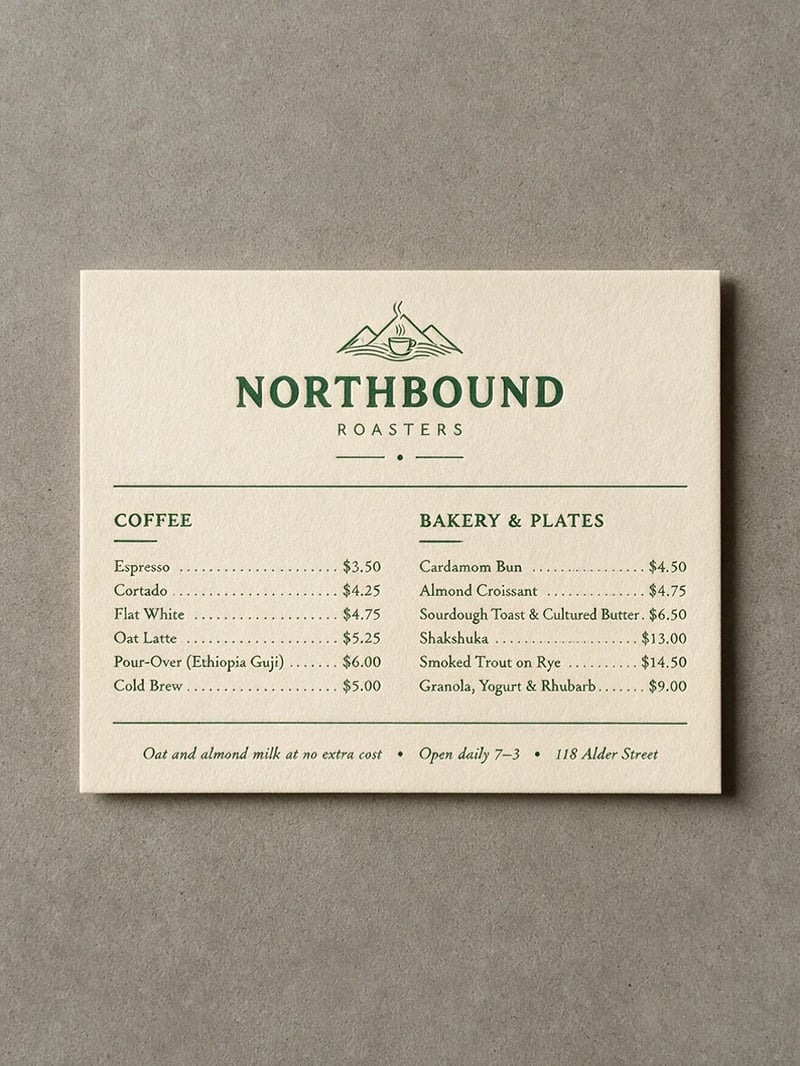
The job: a printed menu for a café counter or a delivery page. Twelve items in two columns, each joined to its price by a dotted leader, a footer line, and the café's mountain-and-cup logo at the top.

Seedream 5.0 Pro got all twelve item names and all twelve prices right and lined them up in their columns, on a card that looks letterpressed into thick cotton paper.

Prompt · Seedream 5.0 Pro · 1K · 3:4

A printed café menu card for "Northbound Roasters", letterpress on thick cream cotton paper in deep green ink, with a small mountain-over-a-coffee-cup logo at the top center. Two columns, each item joined to its price by a dotted leader. Left column "COFFEE": Espresso 3.50, Cortado 4.25, Flat White 4.75, Oat Latte 5.25, Pour-Over (Ethiopia Guji) 6.00, Cold Brew 5.00. Right column "BAKERY & PLATES": Cardamom Bun 4.50, Almond Croissant 4.75, Sourdough Toast & Cultured Butter 6.50, Shakshuka 13.00, Smoked Trout on Rye 14.50, Granola, Yogurt & Rhubarb 9.00. Footer in small italics: "Oat and almond milk at no extra cost · Open daily 7–3 · 118 Alder Street". Shot straight on, the whole card in frame, soft even light.

What we did not ask for
The model put a currency sign in front of every price and laid the card landscape on a grey table, leaving empty space above and below. Say "no currency symbol" or "the card fills the frame" if you want otherwise.
To reuse it
Replace the sections, items and prices with yours and keep the "item, then price" pattern. Name the paper, the ink and the font style. For a long menu, make one card per section.
Seedream 5.0 Pro letterpress menu card for Northbound Roasters with Coffee and Bakery & Plates columns, twelve items with dotted leaders to their prices, and a footer line

A product photo from reference images

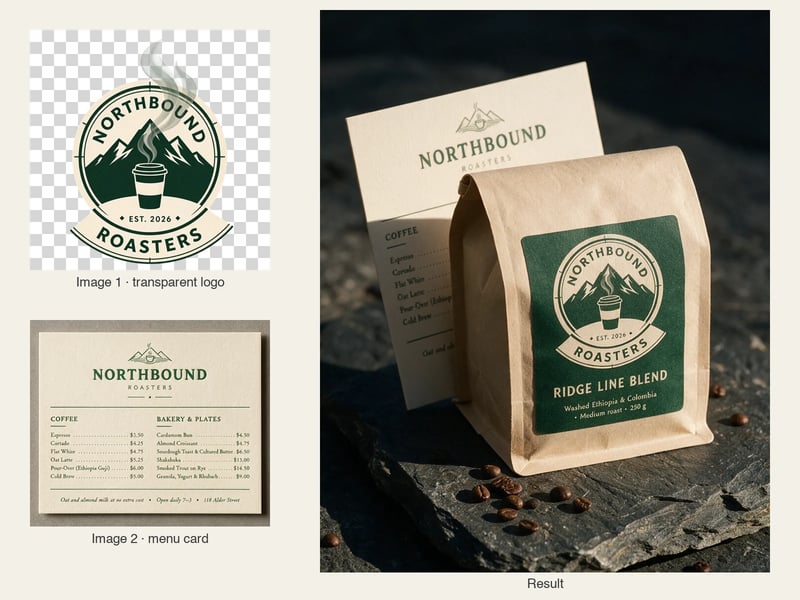
The job: a shop listing photo that reuses brand files you already have. We uploaded two images, the transparent logo from our Seedream 5.5 test and the menu card above, and asked for a kraft coffee bag wearing that logo, with the menu propped behind it.

Seedream 5.0 Pro put the logo on the bag's label with its wording intact, matched the label to the logo's deep green, and spelled the new lines "RIDGE LINE BLEND" and "Washed Ethiopia & Colombia · Medium roast · 250 g" right.

Prompt · Seedream 5.0 Pro edit · 2 reference images · 1K · 4:5

Use image 1 as the logo and image 2 as the café's menu card. Make a product photo for the café's online shop: a matte kraft-paper coffee bag with a fold-over top and a deep green paper label, standing on a slab of dark slate. Print the logo from image 1 on the label, and under it in cream capitals: "RIDGE LINE BLEND", then smaller: "Washed Ethiopia & Colombia · Medium roast · 250 g". Prop the menu card from image 2 behind the bag, slightly out of focus. A few roasted coffee beans on the slate, low morning light from the right, deep soft shadows, true-to-life color.

What came out differently
We asked for the menu slightly out of focus; it came back sharp. The label's last line wrapped onto two lines with a stray dot at the start.
To reuse it
Say which uploaded image is which ("image 1 is the logo, image 2 is the menu"), then describe the product, the surface and the light. You can add up to 10 images: a logo, a product photo, a color swatch or a style reference.
Try it in the generator
Two input images, a transparent Northbound Roasters logo and a printed menu card, next to the Seedream 5.0 Pro result: a kraft coffee bag with a green label carrying the logo and Ridge Line Blend, on dark slate with the menu behind it
Prompt habits

How to write Seedream 5.0 Pro prompts for text

Four Seedream 5.0 Pro prompt habits taken from the runs above. Each one changes how much the model has to guess.

  • 01

    Put every word in quotes

    Seedream 5.0 Pro draws the words you put in quotes and has to guess the ones you don't. Instead of "a menu with coffee prices", write each line: "Espresso 3.50", "Cortado 4.25". In our runs every quoted price and every quoted Chinese and Japanese line came out as written. The one slip was an extra word in a step name, so read the image line by line before you use it.

  • 02

    Describe the layout zone by zone

    Name the zones in order: top, center, bottom band, footer. The night-market prompt said where the three names go, what the picture shows and that the dates run in three aligned columns, and the poster followed that plan. A loose prompt such as "a poster with the dates in three languages" leaves the model to decide where everything goes.

  • 03

    Name the type size and weight

    Say how big and how heavy each line should be: "heavy condensed capitals" for a headline, "small capitals" for a footer, "a bold matching weight" when two scripts sit side by side. That hierarchy is what makes a dense layout readable at a glance. Whatever you leave out, the model decides for you: it added currency signs to the menu because the prompt did not say either way.

  • 04

    Keep each line short enough to fit

    Long lines are where dense layouts break. The English date on the night-market poster wrapped after "2026 ·", and the coffee bag's last label line wrapped with a stray dot at the start. Give the model one short line per row, split a long caption into two quoted lines, or place the break yourself: "then, on a second line, ...".

Quick facts

Seedream 5.0 Pro settings and cost

What you can set when you run Seedream 5.0 Pro in our generator.

Made by
ByteDance's Seed team, in the Seedream 5.0 generation with Seedream 5.0 Lite
Inputs
A prompt, or a prompt plus up to 10 reference images; one image per run
Output sizes
1K or 2K
A free account can run 1K; 2K needs a plan or a pack.
4K
Not available here. Seedream 5.0 Pro runs at 1K or 2K on this site.
Shapes
15, from 1:3 tall to 3:1 wide, plus 21:9 and 9:21
Time per 1K image in our runs
71 to 98 seconds, four runs on November 16, 2026
Free to try
Yes, a new account can make a first 1K image
Cost
Shown in the generator before you start; per-image figures are in the comparison below
Commercial use
Images made on a paid plan or pack can be used commercially; images made only with the free sign-up allowance are for personal use
Compare

Seedream 5.0 Pro, Lite or 5.5: which to use

The three Seedream versions on this site, side by side. Times are from our own runs on November 16, 2026; the rest is from our generator's settings.

This pageSeedream 5.0 ProText and layoutUse Seedream 5.0 ProSeedream 5.0 LiteEveryday images, big filesCompare on the home pageNewestSeedream 5.5Long edits, transparent assetsSee Seedream 5.5
Choose it forMenus, infographics, multilingual posters, and prompts you already tuned for itSocial images, product shots and large 2K or 3K filesNew work, many rounds of edits on one image, logos and stickers with a transparent background
Sizes1K or 2K2K or 3K1K, 1.5K or 2K
Credits per image9 at 1K, 20 at 2K6 at 2K or 3K4 at 1K or 1.5K, 7 at 2K; edits add a little per reference image
Reference images per editUp to 10Up to 14Up to 10
Transparent backgroundNoNoYes
Time per 1K image in our runs71 to 98 seconds (4 runs)Not timed for this page21 to 30 seconds (10 runs)
FAQ

Seedream 5.0 Pro questions

Seedream 5.0 Pro

Make a text-heavy image with Seedream 5.0 Pro

Start from one of the four prompts above, change the words in quotes to yours, and run it at 1K.