
SeedreamX

Seedream 5.5 AI Image Generator Seedream 5.5 Editing and Transparent PNGs

ByteDance Seedream 5.5: edit one image round after round, cut-outs and clean text.

Seedream 5.5 is ByteDance's newest image model, released on November 9, 2026. ByteDance says it keeps the areas you don't touch steady across up to 100 rounds of edits, outputs transparent and semi-transparent images directly, and makes far fewer severe text errors than Seedream 5.0 Pro. Here you can run Seedream 5.5 from a prompt or up to 10 reference images, at 1K, 1.5K or 2K. Below: ByteDance's test numbers and the prompts we ran on it.

  • Up to 100 edit rounds on one image
  • Seedream 5.5 transparent background
  • 0.4% severe text errors (ByteDance)
  • 1K to 2K, up to 10 reference images
0
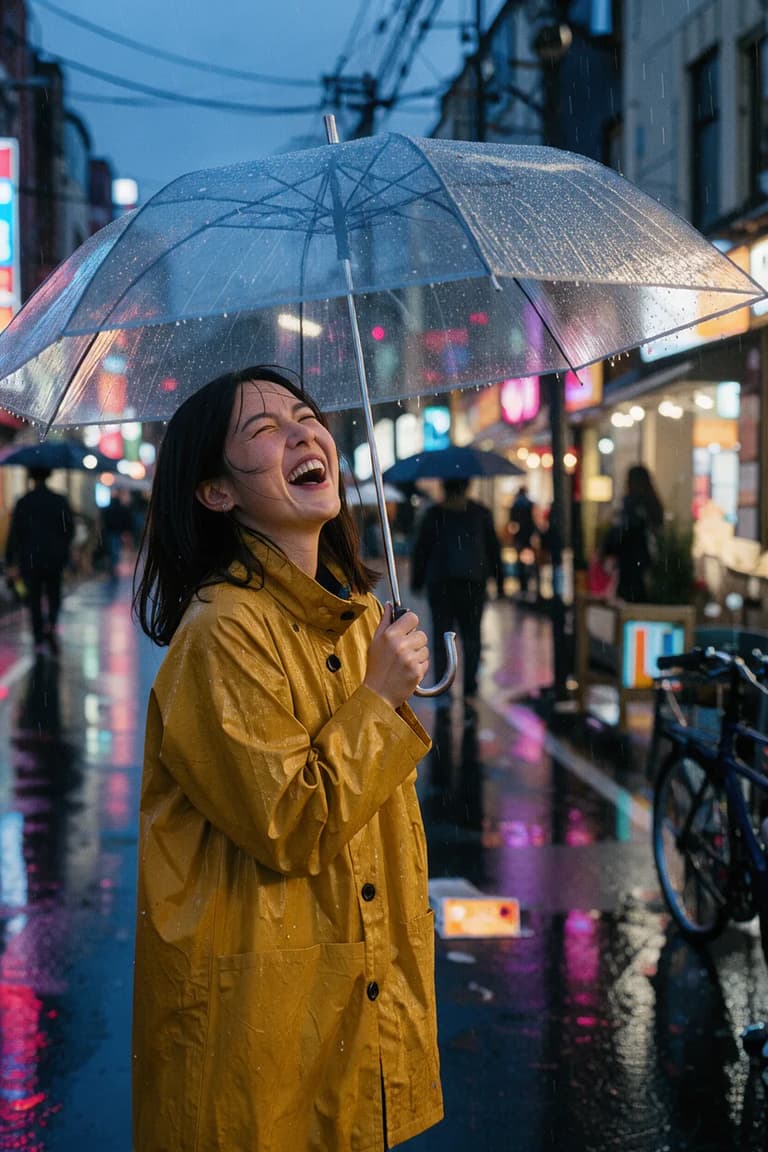
Rainy Tokyo street portrait
Prompt idea
Prompt

Candid street portrait of a young woman in a mustard raincoat laughing under a clear umbrella on a rainy Tokyo side street at dusk, neon reflections on wet asphalt, shallow depth of field, 35mm film look.

Quick facts

Seedream 5.5 at a glance

What ByteDance has confirmed, and what it has not announced yet, as of November 9, 2026.

Made by
ByteDance's Seed team
Released
November 9, 2026
Editing
Up to 100 rounds on one image
Areas you don't ask to change stay the same at the pixel level, with no color drift.
Transparency
Native transparent and semi-transparent output
The image comes out with an alpha channel, so there is no cut-out step.
Text errors in ByteDance's test
0.4% severe, 1.7% minor
Chinese and English text, including dense small type.
Versions
Seedream 5.5, with a Pro version announced for later
Rolling out on
Dreamina (Jimeng), Doubao, Doubao Work and Volcano Engine Ark
Name in Volcano Engine Ark
Doubao-Seedream-5.5
On this site
1K, 1.5K or 2K output, up to 10 reference images, transparent background option
These are our generator's settings, not limits ByteDance has published.
Not announced by ByteDance yet
Its official resolution list, reference-image limit, public API model ID and price
What changed

What's new in Seedream 5.5

ByteDance Seedream 5.5 is built around four upgrades: long edit sessions, transparent assets, text you can read, and more natural photos.

Multi-round editing: up to 100 rounds on one image

Seedream 5.5 editing is built for long sessions on the same picture. ByteDance says you can keep revising one image for up to 100 rounds, and the parts you don't mention stay put at the pixel level, with no color drift building up from round to round. In this official sample a plain study turns into a bright kids' room one change at a time: shelves, rug, chair, wall color and lamp change, while the room's layout and the camera angle stay where they were. That matters for product series, ad variants and comic pages, where one face, logo or headline has to survive many rounds of changes.

Seedream 5.5 official sample: a study with wooden shelves edited round by round into a colorful kids' room with blue shelves, a checked rug and a pink octopus beanbag

Transparent and semi-transparent images, no cut-out

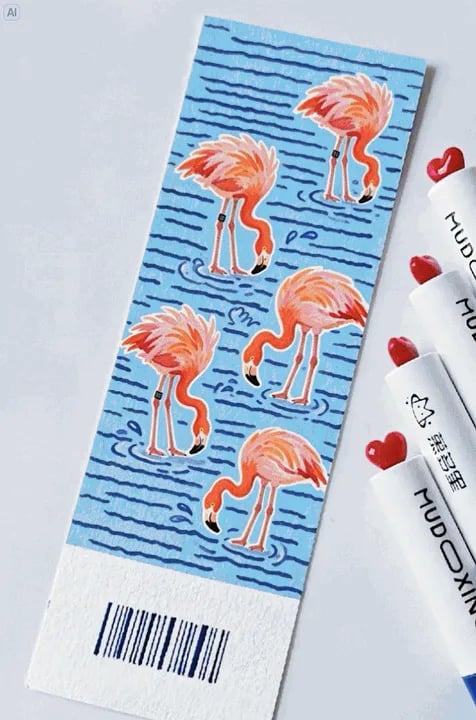
Seedream 5.5 can return an image with a real alpha channel, so a logo, sticker, product shot or overlay arrives with a transparent background, and soft edges like smoke, glass or feathers stay semi-transparent instead of getting a hard outline. In the official sample a flamingo photo becomes a transparent cut-out and then a sticker on a suitcase. To ask for it, describe only the subject and add a line such as "transparent background, PNG with alpha channel".

Seedream 5.5 official sample: a flamingo photo turned into a transparent cut-out on a checkerboard background, then placed as a sticker on a blue suitcase

Text rendering: small Chinese and English text, spelled right

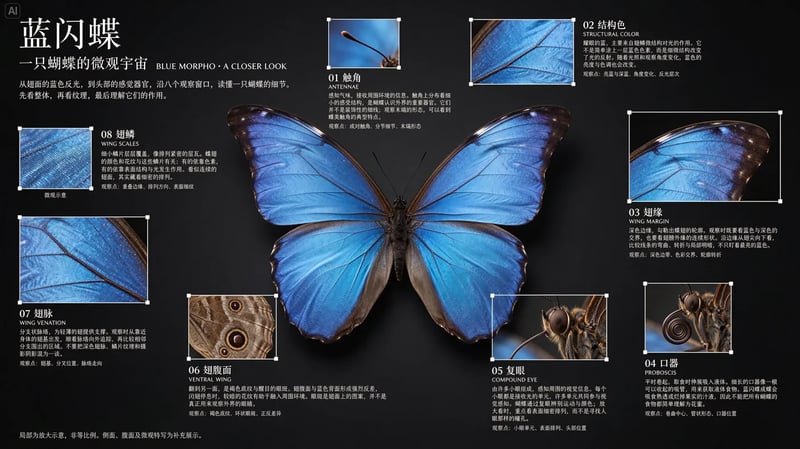
Seedream 5.5 text rendering targets the hard cases: complex characters, dense captions and tiny labels on posters, infographics and packaging. This official sample is a Chinese infographic about the blue morpho butterfly, with eight labeled close-ups and paragraph-length notes in small type. Because edits leave the rest of the image alone, you can also replace the text on a finished poster and keep the layout.

Seedream 5.5 official sample: a Chinese infographic of a blue morpho butterfly with eight labeled close-ups and small-print notes on a black background

More natural light, skin and materials

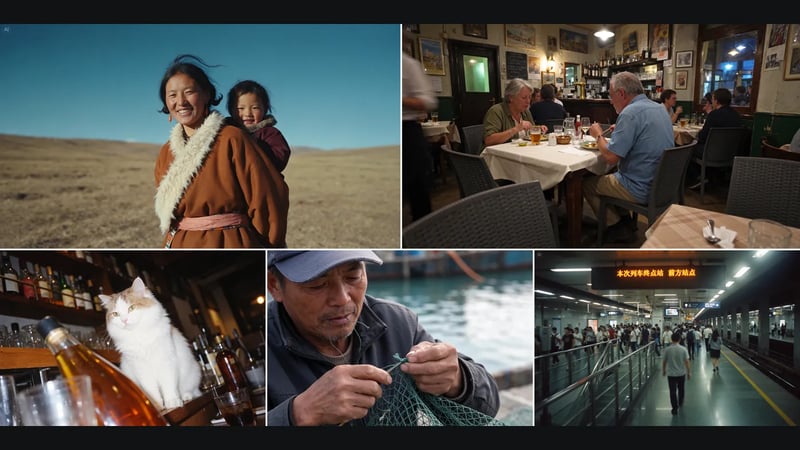
Seedream 5.5 realism improves lighting, materials and skin texture, and ByteDance says it cuts the over-glossy, overexposed look that makes AI photos easy to spot. The official samples are everyday scenes: a mother and child on a grassland, a crowded bistro, a cat on a bar counter, a fisherman mending a net and a busy metro platform.

Seedream 5.5 official realism samples: a mother and child on a grassland, diners in a bistro, a cat on a bar, a fisherman mending a net and a metro platform

Seedream 5.5 benchmarks: what ByteDance measured

The Seedream 5.5 benchmark results come from ByteDance's own evaluation on its MagicArena platform, where expert raters scored image quality and how often a result was usable as delivered.

Across six kinds of work (e-commerce, marketing, film and TV, gaming, office and fashion design), Seedream 5.5 scored higher than Seedream 5.0 Pro on both counts. For film and TV and for office work, its usable rate was more than twice the earlier model's.

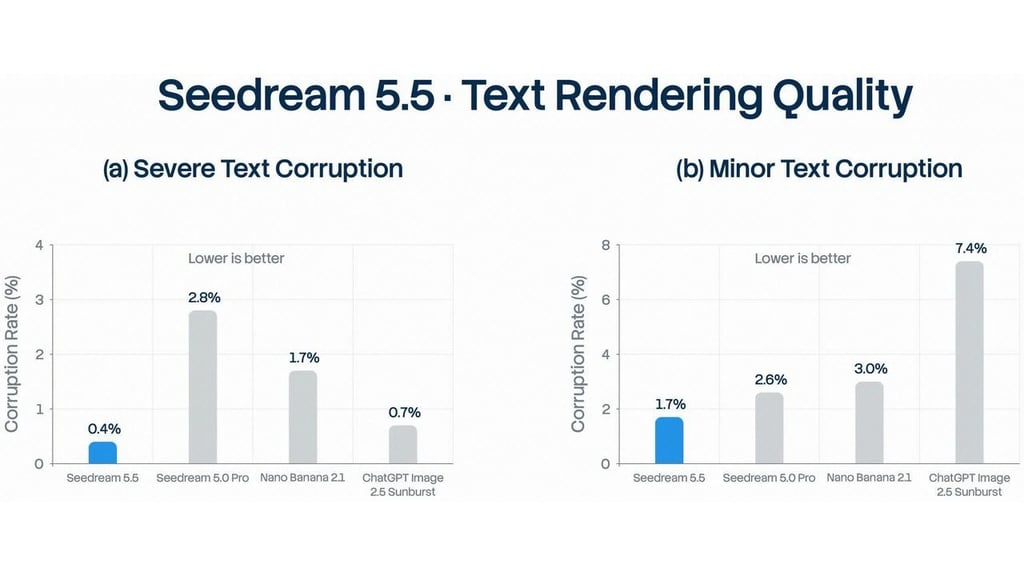
On text, the severe error rate fell to 0.4%, against 2.8% for Seedream 5.0 Pro, 1.7% for Nano Banana 2.1 and 0.7% for GPT Image 2.5 Sunburst. Minor errors were 1.7%, against 2.6%, 3.0% and 7.4%. In good-same-bad preference tests on realistic image editing, Seedream 5.5 scored +55.62% against the previous generation.

These are ByteDance's tests, not independent ones. Treat them as a guide to what the model was tuned for and check your own prompts.

ByteDance chart of Seedream 5.5 text rendering: severe text errors 0.4% versus 2.8% for Seedream 5.0 Pro, 1.7% for Nano Banana 2.1 and 0.7% for GPT Image 2.5 Sunburst; minor errors 1.7%, 2.6%, 3.0% and 7.4%
Compare

Seedream 5.5 vs Seedream 5.0 Pro

Seedream 5.0 Pro was the model ByteDance measured Seedream 5.5 against. Test figures are from ByteDance's launch post.

NewSeedream 5.5Long edits and transparent assetsUse Seedream 5.5Seedream 5.0 ProText and layout
ReleasedNovember 9, 2026Earlier in the Seedream 5.0 line, alongside 5.0 Lite
Long edit sessionsUp to 100 rounds, untouched areas held at the pixel levelNo round count published by ByteDance
Transparent outputNative transparent and semi-transparent imagesNot listed by ByteDance
Severe text errors0.4%2.8%
Minor text errors1.7%2.6%
Usable results in film and TV, office workMore than twice Seedream 5.0 ProBaseline
Sizes1K, 1.5K or 2K in the generator above1K or 2K in the generator above
Cost here per 1K image4 credits9 credits
Prompt guide

Seedream 5.5 prompts that use the new features

Three example prompts written for this page, not official samples: each turns a loose line into one that tells the model exactly what to change and what to keep. All three run on Seedream 5.5 in the generator above; the edit and translation habits work on Seedream 5 Pro too.

Edit in rounds without drift · loose edit

“Change her jacket to a blue fleece.”

Edit that holds the rest

Change only two things: (1) her outfit becomes an oversized glacier-blue fleece zip jacket with matching wide fleece trousers and light grey chunky sneakers, hands still in the jacket pockets; (2) the backdrop becomes a seamless glacier-blue studio wall #9EC1CC with a soft gradient. Keep everything else exactly as it is: her face, hair, body, pose and feet; every piece of text, with its wording, font, color, size and position; the framing, camera angle, lighting and aspect ratio.

What changed
One or two changes per round
Numbered changes make it clear where the edit stops. Fewer changes per round means less for the model to redraw.
A keep list
Naming the face, pose, text and camera tells the model what must survive. Long edit sessions drift when the keep list is missing.
Feed the last result back
Use each round's output as the next round's input, and keep the keep list word for word.
Check after each round
  • The face still matches round one
  • Small text has not moved, changed size or come in front of the subject
  • Colors outside the edit have not shifted
Ask for a transparent PNG · loose request

“A coffee shop logo without a background.”

Transparent asset request

A round badge logo for a coffee shop called "Northbound Roasters": a simple mountain line over a coffee cup, deep green and cream, flat vector style, the name in clean capitals around the edge. Transparent background, PNG with alpha channel, no backdrop, no shadow, no frame.

Native transparent output is one of Seedream 5.5's additions. In the generator above, set the background to transparent as well as writing it in the prompt. Seedream 5 Pro does not output an alpha channel.

What changed
Transparency named in plain words
"Transparent background, PNG with alpha channel" asks for real transparency instead of a white or checkered backdrop drawn into the picture.
Nothing to cut around
"No shadow, no frame" keeps stray pixels off the edges, so the logo drops cleanly onto a website, a cup or a slide.
The text written out
Put the exact name in quotes so the letters are drawn, not guessed.
Check the file
  • The background shows as transparent in an image editor, not as a painted checkerboard
  • Edges stay clean on both a dark and a light page
Turn one poster into another language · loose request

“Translate this poster into Japanese.”

Localize and keep the layout

Replace only the text on this poster with Japanese: the headline "QUIET" becomes "静寂", and "FALL / WINTER 2026 COLLECTION" becomes "2026 秋冬コレクション". Keep each line in the same position, size, weight and color. Do not change the model, the clothes, the background, the lighting or the framing.

What changed
The new text supplied
Give the translation yourself so the model only has to draw it, not translate it.
Line-by-line mapping
Pairing each old line with its replacement keeps the hierarchy of headline and small print.
Everything else locked
The same keep list as a normal edit, so the picture stays identical across language versions.
Check each version
  • Every character is correct, including small print
  • The headline sits where the English one did
Tested on this site

We ran these prompts on Seedream 5.5

We ran the three Seedream 5.5 prompts above in our generator at 1K on November 16, 2026, one run per step: the edit recipe on a product shot over five rounds, the transparent logo with steam added for soft edges, and the poster swapped into Japanese and Chinese. Here is what came back, what held and what slipped. Every prompt is shown in full.

Five rounds of edits on one product shot

The job: one product photo turned into a set of listing and ad images, the way a shop builds colorways and a campaign from a single shoot. We made a starting shot of a navy water bottle with small printed text, then fed each result back in with one change per round: a terracotta backdrop, palm-leaf shadows, a sage-green bottle, condensation droplets and an ad line.

Across all five rounds the bottle's shape, the bamboo cap, the travertine block and the small print "TIDEWATER" and "Keeps cold 24 h · hot 12 h · 750 ml" stayed the same, letter for letter. In round 3 the whole bottle turned green while the printed text stayed white and in place.

Prompts · Seedream 5.5 · 1K · 4:5 · each round edits the one before

Start: Product listing photo for an online store. A matte navy stainless-steel insulated water bottle with a natural bamboo screw cap stands on a small block of pale travertine stone. Printed on the bottle in small white sans-serif type: "TIDEWATER" on the front, and directly under it, smaller, "Keeps cold 24 h · hot 12 h · 750 ml". Plain warm-grey seamless studio backdrop, soft daylight from the upper left, one crisp shadow falling to the right, sharp focus, true-to-life color. Round 1: Change only the backdrop: it becomes a terracotta-orange seamless wall and floor. Keep everything else exactly as it is: the bottle, its cap, every word printed on it with the same font, size and position, the travertine block, the light direction, the shadow and the framing. Round 2: Change only one thing: add the soft shadow of palm leaves falling across the wall and the travertine block from the left, as if through a window in late-morning sun. Keep the bottle, its cap, every printed word, the colors and the framing exactly as they are. Round 3: Change only the bottle's color, from matte navy to matte sage green. Keep the printed text white, with the same words, font, size and position; keep the bamboo cap, the travertine block, the terracotta wall, the leaf shadows and the framing exactly as they are. Round 4: Change only one thing: add fine cold condensation droplets on the bottle's surface. Keep everything else exactly as it is, including every printed word, the bamboo cap, the travertine block, the wall, the leaf shadows and the framing. Round 5: Add one line of ad text in the top-left area of the wall: "Cold till sundown." in a bold serif, cream color, about one tenth of the image height. Keep everything else exactly as it is: the bottle, its printed text, the droplets, the cap, the travertine block, the leaf shadows, the colors and the framing.

What drifted
After the first edit the image came back slightly smaller (896 × 1120 against 915 × 1144), and the size changed again in round 5, so the framing moved by a few pixels. The round 5 ad line is smaller than the one tenth of the image height we asked for, and the round 4 droplets are easy to miss at thumbnail size.
To reuse it
Start from a clean shot of your product, change one thing per round, and repeat the keep list word for word, naming any printed text that has to survive. Upload the last result as the next round's input.
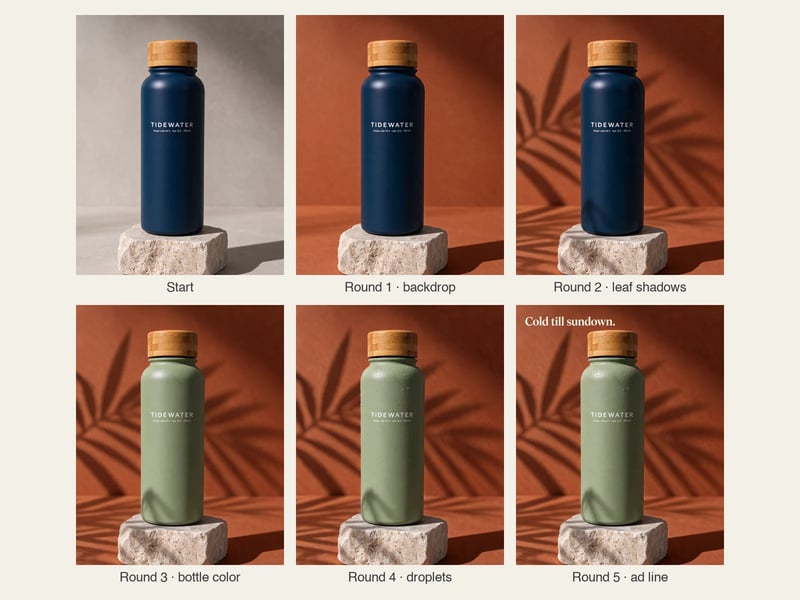
Seedream 5.5 test: six versions of one Tidewater water bottle photo, from a navy bottle on grey to a sage-green bottle with droplets, palm-leaf shadows on a terracotta wall and the ad line Cold till sundown

A transparent logo, straight out of the model

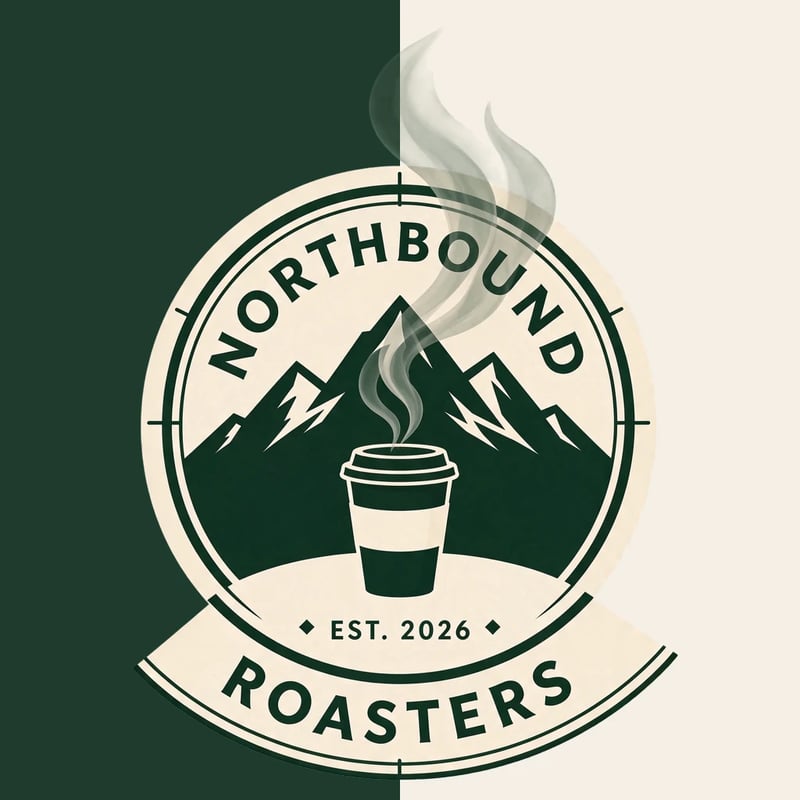
The job: a logo file you can drop onto a website, a cup or a slide without cutting it out. We ran the badge prompt above with one addition, steam rising from the cup that should stay see-through, and set the generator's background option to transparent.

The file came back as a 1024 × 1024 PNG with a real alpha channel: the badge is solid, the corners are empty, and the steam is semi-transparent, so both halves of the background behind it show through. "NORTHBOUND", "ROASTERS" and "EST. 2026" are spelled right.

Prompt · Seedream 5.5 · 1K · 1:1 · background: transparent

A round badge logo for a coffee shop called "Northbound Roasters": a simple mountain line over a coffee cup, deep green and cream, flat vector style, the name in clean capitals around the edge and "EST. 2026" small at the bottom. Soft wisps of steam rise from the cup and drift up past the top of the badge, semi-transparent so whatever is behind the logo shows through them. Transparent background, PNG with alpha channel, no backdrop, no shadow, no frame.

What changed from the prompt
We asked for a simple mountain line over a coffee cup; it drew solid mountain peaks and a takeaway cup. The steam stands out on the dark half and reads lighter on the cream half.
To reuse it
Swap the name, the symbol and the two colors. Keep "Transparent background, PNG with alpha channel, no backdrop, no shadow, no frame" and set the background option to transparent. Check soft details such as steam, smoke or glass on both a dark and a light page.
Seedream 5.5 test: a transparent Northbound Roasters badge logo with semi-transparent steam rising from a coffee cup, laid over a half dark green, half cream background so the transparency shows

The same poster in three languages

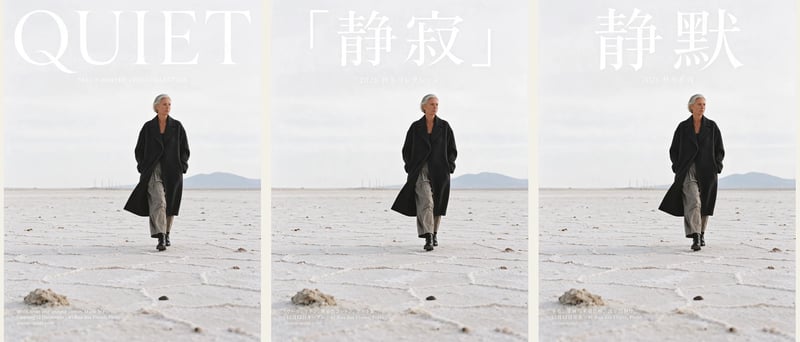
The job: one campaign poster for three markets without a new shoot. We made an English lookbook poster with a headline, a subline and three lines of small print, then asked Seedream 5.5 twice to replace only the text, once with Japanese and once with Simplified Chinese, using the English poster as the input both times.

The woman, her coat, the salt flat and the framing are the same in all three versions. Every Japanese and Chinese character is the one we supplied, each line sits where the English line was, and the web address stayed as it was.

Prompts · Seedream 5.5 · 1K · 3:4 · two text-only edits

English poster: A fashion lookbook poster for a small clothing label. Full-bleed photo: a woman in her forties with short silver hair, wearing an oversized charcoal wool coat, walks across a pale salt flat under a flat white overcast sky, shot from a low angle, muted film colors. Huge thin serif headline across the top: "QUIET". Under it, smaller spaced capitals: "FALL / WINTER 2026 COLLECTION". In the bottom-left corner, three lines of small white text: "Wool, linen and undyed cotton. Made in Porto." / "Opening 12 December · 41 Rua das Flores, Porto" / "atelier-quiet.com". Japanese version (edit, the English poster as input): Replace only the text on this poster with Japanese, line for line: "QUIET" becomes 「静寂」. "FALL / WINTER 2026 COLLECTION" becomes 「2026 秋冬コレクション」. "Wool, linen and undyed cotton. Made in Porto." becomes 「ウール、リネン、無染色コットン。ポルト製。」. "Opening 12 December · 41 Rua das Flores, Porto" becomes 「12月12日オープン · 41 Rua das Flores, Porto」. Keep "atelier-quiet.com" as it is. Keep each line in the same position, size, weight and color. Do not change the woman, her coat, the salt flat, the sky, the lighting or the framing. Chinese version (edit, the English poster as input): Replace only the text on this poster with Simplified Chinese, line for line: "QUIET" becomes 「静默」. "FALL / WINTER 2026 COLLECTION" becomes 「2026 秋冬系列」. "Wool, linen and undyed cotton. Made in Porto." becomes 「羊毛、亚麻与未染色棉。波尔图制作。」. "Opening 12 December · 41 Rua das Flores, Porto" becomes 「12月12日开业 · 41 Rua das Flores, Porto」. Keep "atelier-quiet.com" as it is. Keep each line in the same position, size, weight and color. Do not change the woman, her coat, the salt flat, the sky, the lighting or the framing.

What went wrong
We wrapped the Japanese lines in 「 」 quote marks, and the model printed the marks as part of the text. The small print and the subline also switched from a sans-serif to a serif in both translations, and the Chinese version turned one full stop into a comma.
To reuse it
Write the new lines yourself, line for line, and quote them with plain straight quotes rather than 「 」 so no marks get drawn. Add "same font as the original" to the keep list when the typeface matters, and read every line of each version.
Seedream 5.5 test: the same fashion poster of a silver-haired woman in a charcoal coat on a salt flat, in English with the headline QUIET, in Japanese and in Simplified Chinese
Uses

Where Seedream 5.5 fits

Seedream 5.5 helps most when one picture has to go through many versions without losing what makes it recognizable.

  • 01

    Product series for a store

    Shoot one hero image, then change the color, the backdrop or the season round after round while the product, label and lighting stay the same.

  • 02

    One poster for several markets

    Swap the headline and small print for each market's wording without redesigning the layout or redrawing the picture.

  • 03

    Stickers, logos and UI assets

    Get cut-outs with transparent and soft edges that drop straight into a website, an app or a slide.

  • 04

    Comic and storyboard pages

    Change the action, the expression or the setting panel by panel while the character's face and costume carry through.

FAQ

Seedream 5.5 questions

Make your next image with Seedream

Try the edit, text and transparent prompts from this page on Seedream 5.5: start with one change per round and a clear keep list.